iSMS Popup (Notify)1.6.2
Publisher Description
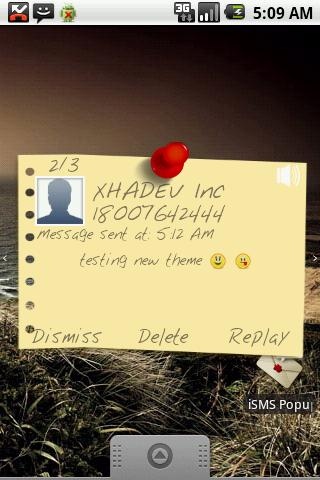
iSMS Popup provides a popup dialog when a message is received that allows you to quickly read and reply to messages.
You can greatly improve the way your device displays notifications.
Full feature list:
- Popup window on incoming message
- multiple messages in popup, simply swipe left/right to browse messages
- quickly reply, delete or close the message
- have your messages read to you using text-to-speech
- reply messages using the system voice recognition
- customize notifications including sound, vibrate
- customize themes (free themes download from market ).
- mark as read messages.
- limit display time for notifications.
- blacklist to prevent spam sms.
NOTE:
Application will only have one theme installed by default, and must install the wishing again from google play, go to the menu style > Theme click on More Themes or download it directly from google play.
This facilitates having only the theme they need or install any new theme without upgrading the application.
Note 2:
(strongly recommend to turn off system's notifications for SMS, otherwise you'll be notified twice for each incoming message)
Relevant keywords :
popup pop up pop-up alert messaging google voice mms sms notify notifier email message.
About iSMS Popup (Notify)
The company that develops iSMS Popup (Notify) is xhadev. The latest version released by its developer is 1.6.2. This app was rated by 1 users of our site and has an average rating of 3.0.
To install iSMS Popup (Notify) on your Android device, just click the green Continue To App button above to start the installation process. The app is listed on our website since 2014-02-27 and was downloaded 51 times. We have already checked if the download link is safe, however for your own protection we recommend that you scan the downloaded app with your antivirus. Your antivirus may detect the iSMS Popup (Notify) as malware as malware if the download link to com.xhadev.ismspopup is broken.
How to install iSMS Popup (Notify) on your Android device:
- Click on the Continue To App button on our website. This will redirect you to Google Play.
- Once the iSMS Popup (Notify) is shown in the Google Play listing of your Android device, you can start its download and installation. Tap on the Install button located below the search bar and to the right of the app icon.
- A pop-up window with the permissions required by iSMS Popup (Notify) will be shown. Click on Accept to continue the process.
- iSMS Popup (Notify) will be downloaded onto your device, displaying a progress. Once the download completes, the installation will start and you'll get a notification after the installation is finished.
Program Details
System requirements
Download information
Pricing
Version History
version 1.6.2
posted on 2014-02-27
1.6.1,- bug fixes,1.6.0,- added blacklist.,- more extensible themes architecture.,- bug fixes.
version 1.6.1
posted on 2013-05-24
Several fixes and updates
